Shortcut Keys for Useful Features
GoCharting offers several shortcut keys for useful features so that they can be quickly accessed. To get the complete list of shortcut keys, check the keyboard sign in the right side of the bottom bar, known as hotkeys.
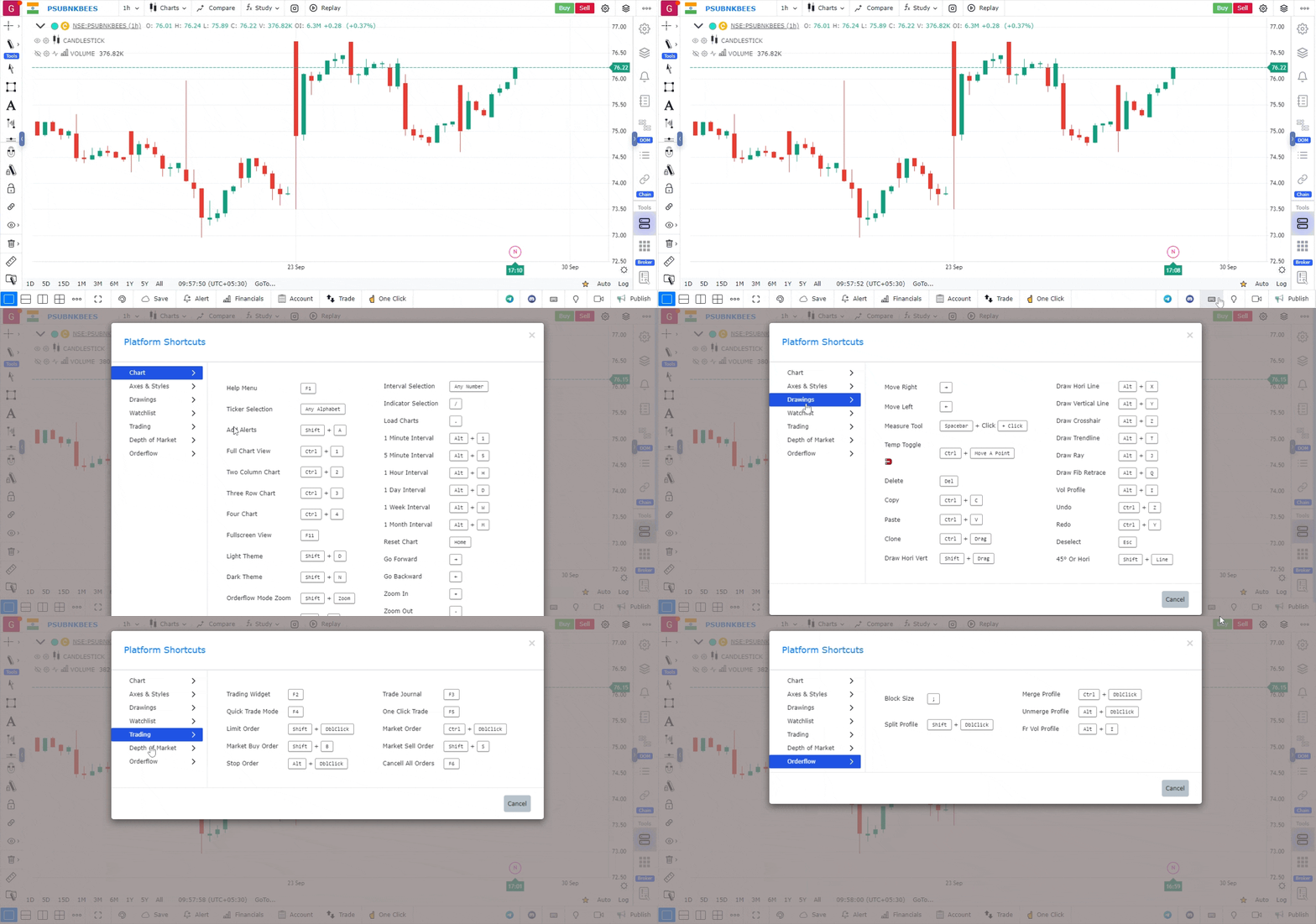
Key for Some Important Features
- Quick Trade Mode –
F4 - One Click Trade –
F5 - Limit Order –
Shift + Double Click - Market Order –
Ctrl + Double Click - Add Alerts –
Shift + A - Light vs Dark Theme –
Shift + D(Light Theme)Shift + N(Dark Theme)
- Chart Interval Selection – Any number
- Save Chart –
Ctrl + S - Cluster Chart –
Alt + F - Measure Tool –
Space + Click - Block Size in Order Flow –
; - Split / Unsplit Profile –
Shift + Double Click - Merge Profile / Unmerge Profile –
Ctrl + Double Click(Merge Profile)Alt + Double Click(Unmerge Profile)
Use Case
GoCharting’s keyboard shortcut system gives traders instant access to drawing tools, chart types, timeframe switches, and trading functions without using the mouse. Mastering shortcuts is one of the highest-leverage investments for trading efficiency.
Strategy
Dedicate one trading session per week for one month exclusively to using shortcuts for all chart interactions. Set up custom shortcuts for your five most-used drawing tools and your two or three primary timeframes. Once mastered, shortcuts eliminate the click-drag workflow lag that can cause missed entries.
Common Mistakes
Do not try to memorise all shortcuts at once; learn five to ten high-impact ones first. Avoid relying entirely on shortcuts for order entry until you have thoroughly tested them in simulation mode. Do not forget to check if custom shortcuts conflict with your operating system’s default shortcut bindings.