Trading Hotkeys
GoCharting is very proud to bring some of the coolest Trading Hotkeys
To view GoCharting Shortcuts, Press F1
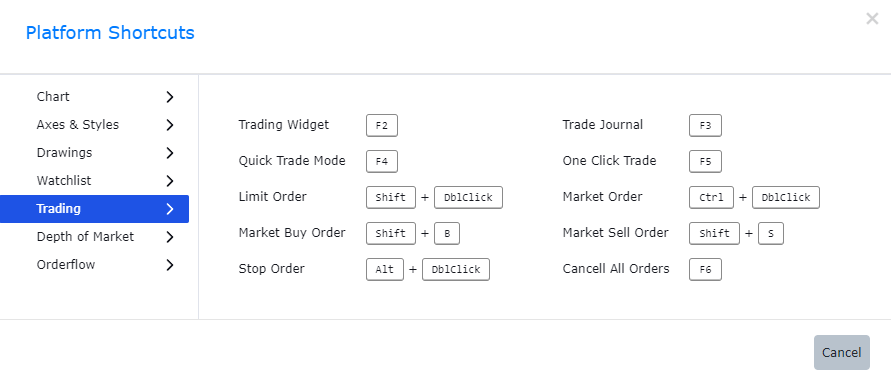
Trading Shortcuts in GoCharting
Use Case
GoCharting’s Trading Hotkeys allow traders to execute orders, switch instruments, adjust positions, and perform key trading actions through keyboard shortcuts. Hotkeys transform keyboard commands into instant market actions that eliminate mouse-click latency.
Strategy
Map your five most frequent trading actions to hotkeys: buy at market, sell at market, cancel all orders, flatten position, and switch to the next watchlist instrument. Practise these hotkeys in Simulation mode until they are muscle-memory before using them in live trading.
Common Mistakes
Do not configure hotkeys while in a live trading session. Avoid mapping hotkeys that are too similar to your OS shortcuts and risk accidental activation. Do not use trading hotkeys without verifying default order sizes are correctly configured — an incorrect size with a hotkey can send a far larger order than intended.