Donchian Channel
The Donchian Channel is a popular technical analysis tool used to identify trends, breakouts, and potential reversal points in the price of an asset. It was developed by Richard Donchian, a pioneer of trend following. You can easily apply this indicator to your charts. Here’s a detailed overview of the Donchian Channel and how to use it.
What is a Donchian Channel?
The Donchian Channel consists of three lines:
- Upper Band: This line represents the highest high over a specified period.
- Lower Band: This line represents the lowest low over the same specified period.
- Middle Band (Optional): Often calculated as the average of the upper and lower bands, providing a reference for the price’s median position.
How to Add Donchian Channel
- Open the platform:
- Go to the platform and select the asset you want to analyze.
- Add Donchian Channel Indicator:
- Click on the Indicators menu in the top toolbar.
- Search for “Donchian Channel” in the search bar.
- Click on the Donchian Channel indicator to add it to your chart.
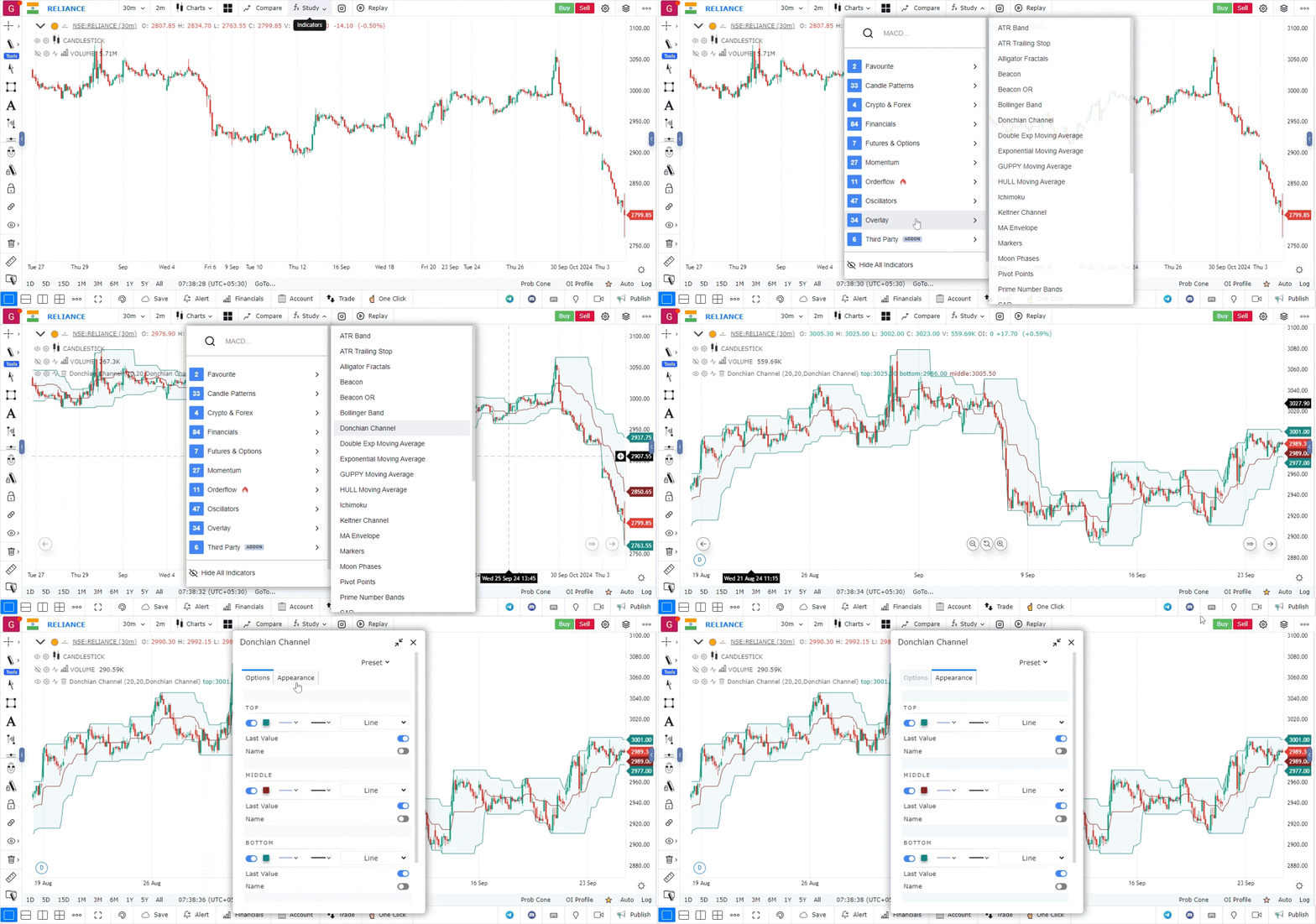
- Configure Settings:
- You can customize the settings based on your trading strategy. Common settings include:
- Period: The number of periods (days, hours, etc.) to look back for the highest high and lowest low. A common setting is 20 periods.
- Color: Customize the colors of the upper and lower bands for better visibility.
- You can customize the settings based on your trading strategy. Common settings include:
How to Interpret the Donchian Channel
- Identifying Trends:
- Uptrend: If the price consistently stays above the upper band, it indicates a strong bullish trend.
- Downtrend: If the price consistently remains below the lower band, it signifies a strong bearish trend.
- Breakouts:
- Bullish Breakout: When the price breaks above the upper band, it may indicate a potential buying opportunity.
- Bearish Breakout: Conversely, when the price breaks below the lower band, it may signal a selling opportunity.
- Range Bound Markets:
- If the price moves between the upper and lower bands without breaking out, it may indicate a ranging market. Traders can look for trading opportunities near the bands (buy near the lower band and sell near the upper band).
- Volatility Assessment:
- The width of the Donchian Channel can give insights into market volatility. A wider channel indicates higher volatility, while a narrower channel suggests lower volatility.
Use Case
The Donchian Channel overlay plots the highest high and lowest low over a rolling period as a channel on the price chart. It is used to define breakout levels, visualise trend strength, and set trailing stops in systematic trend-following approaches.
Strategy
Enter long when price closes above the upper channel boundary for the first time in the lookback period. Trail stops at the midpoint of the channel. Use a 20-period channel for short-term momentum and a 55-period for longer-term trend following.
Common Mistakes
Do not use Donchian Channels in low-volatility, ranging markets — false breakouts are common. Avoid entering on an intrabar touch of the channel; wait for a daily close. Do not use a single period setting universally; adjust based on the instrument’s typical trend duration.