Elliott Correction Wave
The Elliott Correction Wave is a concept from Elliott Wave Theory used to identify corrective movements in the market, typically occurring after an impulsive wave. The correction wave patterns consist of three main waves labeled as A, B, and C and are characterized by their retracement of the previous trend. The platform provides tools to visualize these correction waves, helping traders identify potential reversal points and trend continuations.
Understanding Elliott Correction Waves
Elliott Correction Waves generally follow a 3-wave structure labeled A-B-C:
- Wave A: The first wave of the correction, typically moving against the direction of the previous trend.
- Wave B: A partial retracement wave that moves in the same direction as the original trend.
- Wave C: The final wave, which usually extends beyond the end of Wave A, completing the correction.
There are different types of correction waves, including Zigzag, Flat, and Triangle patterns.
Steps to Use the Elliott Correction Wave Tool
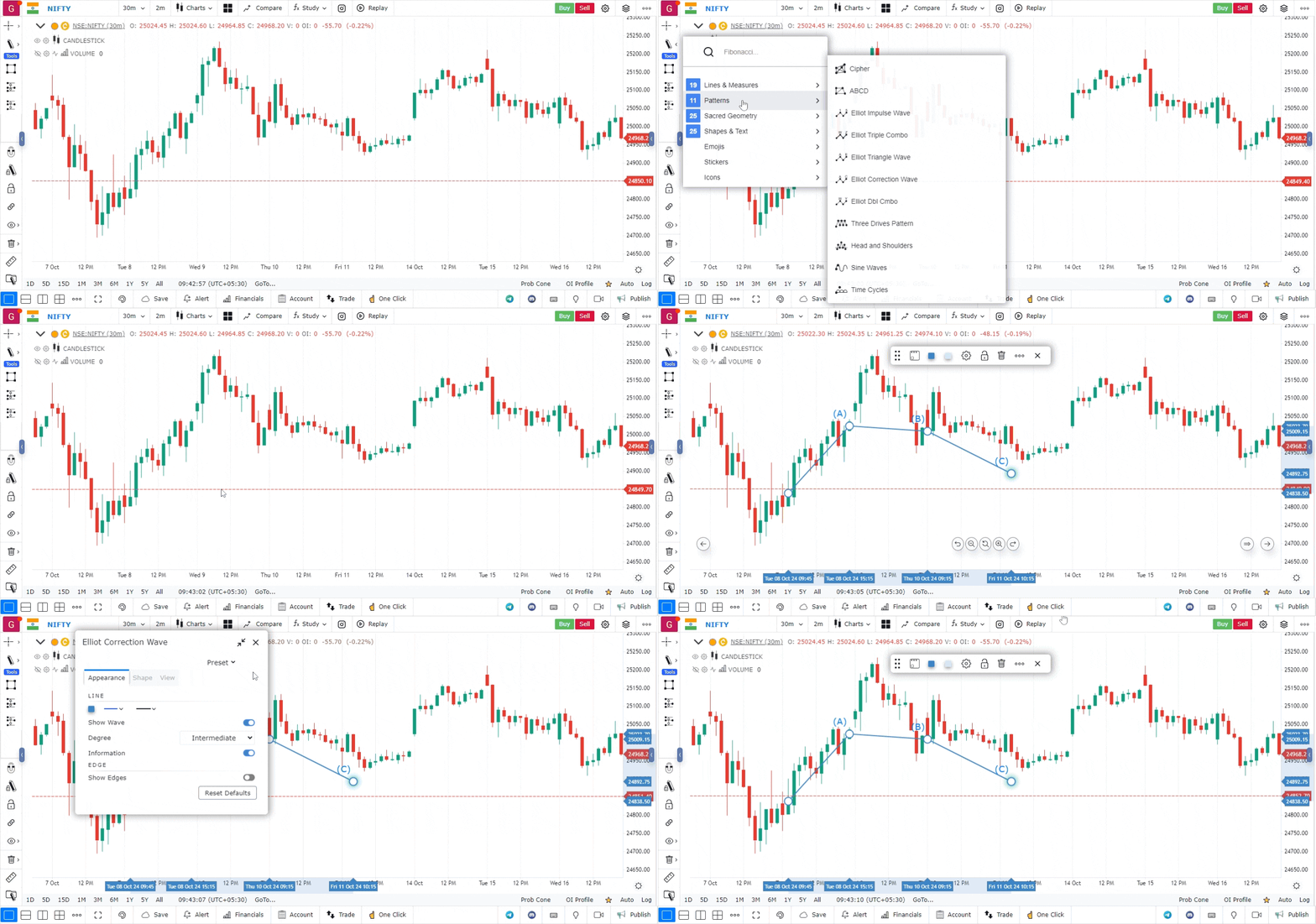
Follow these steps to use the Elliott Correction Wave tool effectively:
-
Access Platform:
- Open the platform and log in to your account.
- Load the chart of the asset you wish to analyze by searching for its ticker symbol.
-
Set the Chart Type and Timeframe:
- Ensure your chart type is set to Candlestick for clear visibility of price movements.
- Select a suitable timeframe that aligns with your analysis strategy (e.g., daily, weekly).
-
Navigate to Drawing Tools:
- Open the Drawing Tools panel located on the side or top of the chart interface.
- Click to expand the list of available tools and indicators.
-
Locate the Elliott Wave Section:
- Find the Elliott Wave section within the drawing tools.
- This section includes various Elliott Wave patterns like impulse waves, triangle waves, and correction waves.
-
Select the Elliott Correction Wave Tool:
- Choose the Elliott Correction Wave tool from the list.
- This tool is specifically designed to help you draw and label the corrective waves (A-B-C) accurately.
-
Plot the Correction Waves:
- Click on the chart to mark the starting point of Wave A.
- Continue plotting the points for Wave B and Wave C in sequence.
- Ensure that each wave follows the appropriate movement as per the chosen correction pattern.
-
Adjust and Customize:
- You can drag and adjust the wave points to fit the market’s price action more precisely.
- Customize the appearance of the waves by changing their color, line thickness, or style.
Use Case
Elliott Correction Waves (A-B-C structures) represent the counter-trend phases within the broader Elliott Wave cycle. Identifying corrective waves allows traders to determine where the prior trend is likely to resume for the next impulse move.
Strategy
Identify the A-B-C correction using the drawing tool. When the C wave approaches the 0.618 or 0.786 Fibonacci retracement of the prior impulse wave, look for a reversal signal to re-enter in the direction of the primary trend. The C wave completion is the highest-probability entry point.
Common Mistakes
Do not confuse a three-wave correction with a new five-wave impulse. Avoid trading A-B-C patterns without confirming that the prior impulse wave was clearly five waves. Do not set targets beyond the prior wave’s extreme without confirming the broader Elliott Wave count supports it.