The Polyline Drawing Tool
The Polyline Drawing Tool is a versatile feature used for creating multi-segment lines on charts. This tool allows users to connect multiple points on the chart, making it useful for drawing trend lines, price channels, or custom patterns. By visually representing data and trends, traders can better analyze price movements and market conditions.
How to Use the Polyline Drawing Tool
-
Open the Chart:
- Log into your account.
- Load the chart of the asset or financial instrument you wish to analyze.
-
Access the Drawing Tools Menu:
- Look for the drawing tools menu, which is typically located on the left side or at the top of the platform interface.
- Click on the drawing tools icon to open a list of available tools.
-
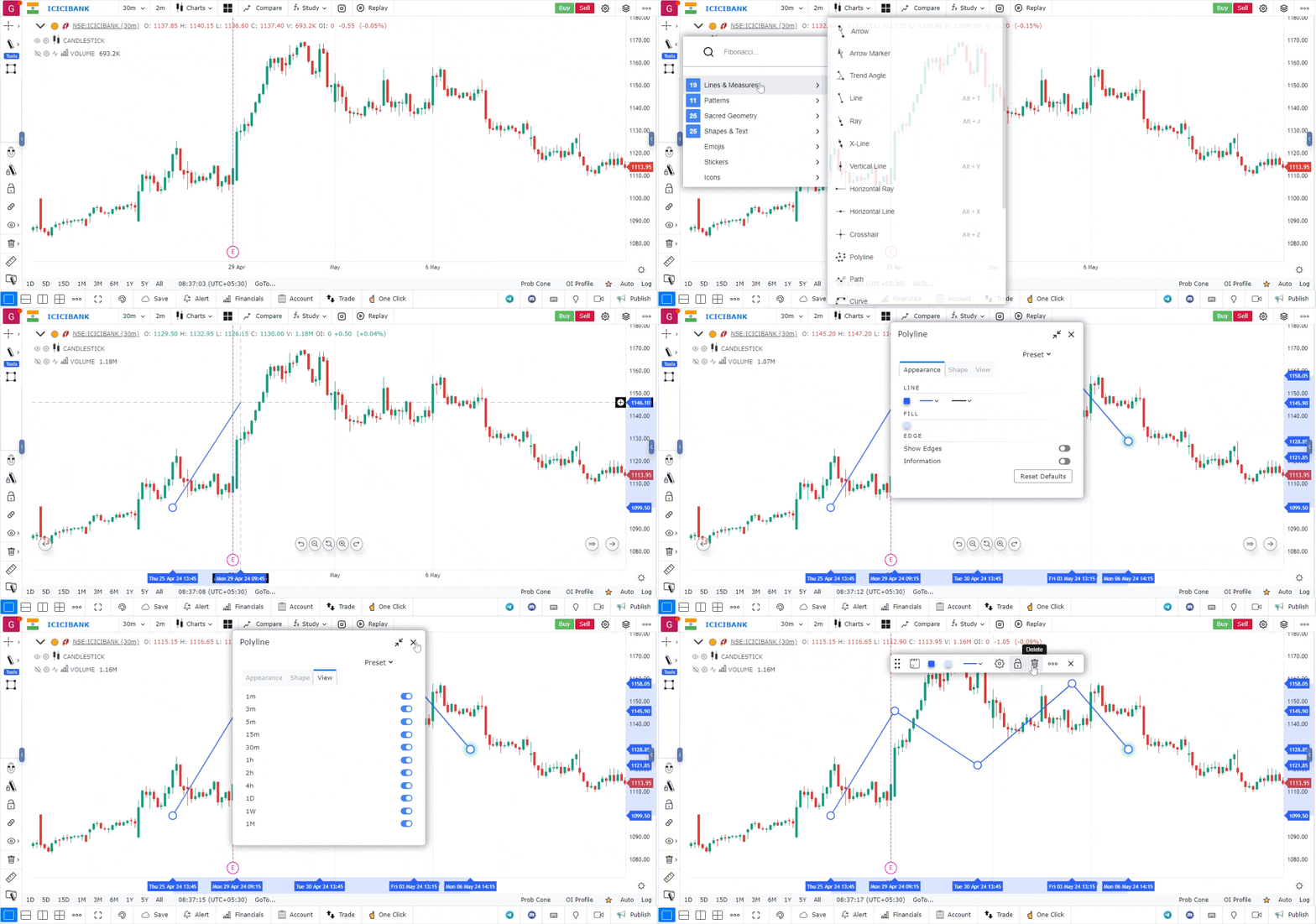
Select the Polyline Tool:
- From the list of tools, choose the Polyline Drawing Tool.
- The icon for this tool usually resembles a line with multiple segments or points.
-
Draw the Polyline:
- Click on the chart to place the first point of your polyline.
- Continue clicking to add additional points. Each click will create a new segment connecting the last point to the new one.
- If you need to create a sharp turn or change direction, simply click at the desired location to add another point.
-
Complete the Polyline:
- To finish drawing the polyline, double-click on the last point or press the ‘Enter’ key, depending on the platform’s instructions.
- The polyline will now remain on the chart for further analysis.
-
Customize the Polyline (Optional):
- Right-click on the polyline to access customization options.
- You can change the color, thickness, and style (solid, dashed, or dotted) of the line to enhance visibility or match your chart’s theme.
-
Move or Adjust the Polyline:
- To reposition any point of the polyline, click and drag the point to a new location.
- If you want to delete the entire polyline, right-click on it and select the delete option.
Use Case
The Polyline tool creates a connected series of line segments by clicking multiple points on the chart. It is used to outline complex chart patterns such as triangles, wedges, and multi-point ascending/descending formations.
Strategy
Use the Polyline tool to outline triangle and wedge patterns by connecting the converging trend lines with a single connected drawing. Once the pattern is outlined, project the breakout target by measuring the height of the pattern at its widest point.
Common Mistakes
Do not use Polyline to create overly complex or subjective patterns. Avoid using polylines to force a pattern onto price action that does not clearly fit the pattern’s requirements. Do not trade polyline-based patterns without confirming the breakout with volume and momentum indicators.