Aroon Oscillator
The Aroon Oscillator is a technical analysis indicator that helps traders identify trends in the market and potential reversals. Developed by Tushar Chande, the Aroon Oscillator measures the strength of a trend by comparing the Aroon Up and Aroon Down indicators. This oscillator can provide insights into whether an asset is trending up, down, or moving sideways.
Key Features of the Aroon Oscillator:
- Trend Strength Measurement: Assesses the strength and direction of a trend in a market.
- Reversal Detection: Can signal potential trend reversals when certain thresholds are crossed.
- Zero Line Crossovers: Provides buy and sell signals based on crossovers above and below the zero line.
Calculation of the Aroon Oscillator
The Aroon Oscillator is calculated using the following formula:
Where:
-
measures the number of periods since the highest high in a specified number of periods.
-
measures the number of periods since the lowest low in the same number of periods.
- Calculate Aroon Up:
- Calculate Aroon Down:
Using the Aroon Oscillator
To effectively analyze the Aroon Oscillator, follow these steps:
-
Load the Chart for the Asset:
- Open the platform.
- Load the chart for the specific asset you wish to analyze.
-
Set the Timeframe:
- Choose an appropriate timeframe for your analysis (e.g., daily, hourly). The Aroon Oscillator can be applied to various timeframes.
-
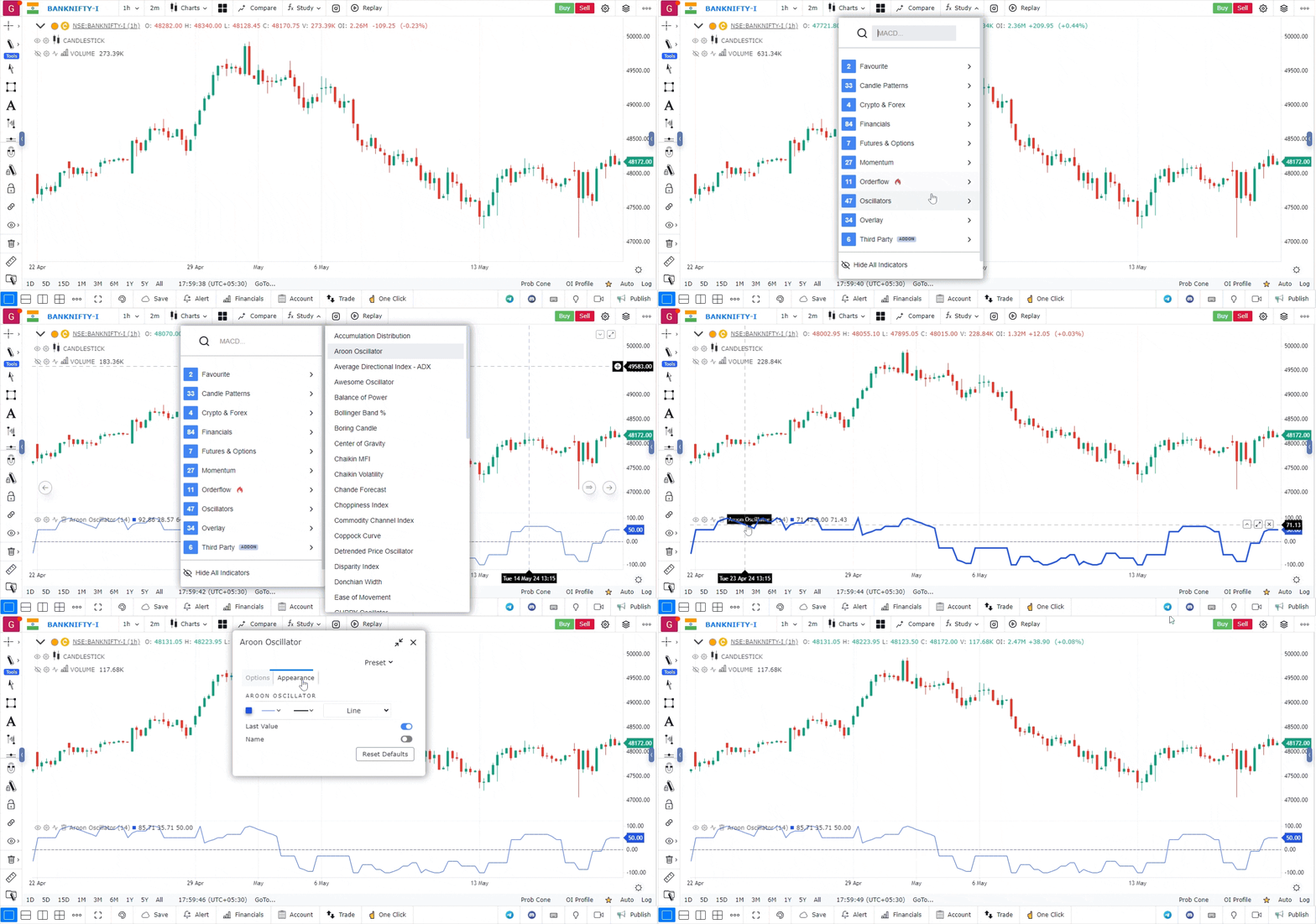
Add the Aroon Oscillator:
- Navigate to the Indicators section on the platform.
- Search for Aroon Oscillator in the list of available indicators.
- Click on the Aroon Oscillator to add it to your chart. It will appear in a separate panel below the main price chart.
-
Interpret Signals:
- Above Zero: When the Aroon Oscillator is above zero, it indicates that the Aroon Up is stronger than the Aroon Down, suggesting an uptrend.
- Below Zero: When the Aroon Oscillator is below zero, it indicates that the Aroon Down is stronger than the Aroon Up, suggesting a downtrend.
- Crossover Signals:
- A bullish signal occurs when the Aroon Oscillator crosses above zero, indicating a potential buy opportunity.
- A bearish signal occurs when the Aroon Oscillator crosses below zero, indicating a potential sell opportunity.
Use Case
The Aroon Oscillator measures the difference between Aroon-Up and Aroon-Down to determine trend strength and direction. It is best used on trending markets and daily/weekly timeframes to identify the start of new trends.
Strategy
Enter long when the Aroon Oscillator crosses above zero and Aroon-Up is above 70, signalling a strong new uptrend. Exit when it crosses back below zero. Combine with a moving average crossover to reduce false signals in ranging markets.
Common Mistakes
Do not trade Aroon signals in choppy sideways markets. Avoid acting on crossovers without confirming price breaking key structure. Do not set parameters too short; the default 14-period is a solid starting point.