Parabolic SAR
The SAR (Stop and Reverse) Indicator is a technical analysis tool designed to help traders identify potential trend reversals and set trailing stop-loss orders. This indicator provides visual cues on price charts, allowing traders to make more informed decisions about entry and exit points.
What is the SAR Indicator?
The SAR indicator, also known as the Parabolic SAR (Stop and Reverse), is used primarily in trending markets to determine potential reversal points. It is based on the concept that as the price moves in a particular direction, the SAR values will follow the price trend, helping traders to set trailing stops effectively.
Key Features:
- Trend Following: The SAR indicator helps traders identify the current trend direction and potential reversal points.
- Visual Representation: It plots dots above or below the price chart, indicating where traders should place stop-loss orders.
- Dynamic Adjustments: The indicator adjusts dynamically with price movements, providing real-time signals.
How to Add the SAR Indicator
-
Open:
- Navigate to the platform and select the asset you wish to analyse.
-
Access the Indicators Menu:
- Click on the Indicators menu located in the top toolbar.
-
Add the SAR Indicator:
- Search for “SAR” or “Parabolic SAR” in the indicators search bar.
- Click on the SAR Indicator to add it to your chart.
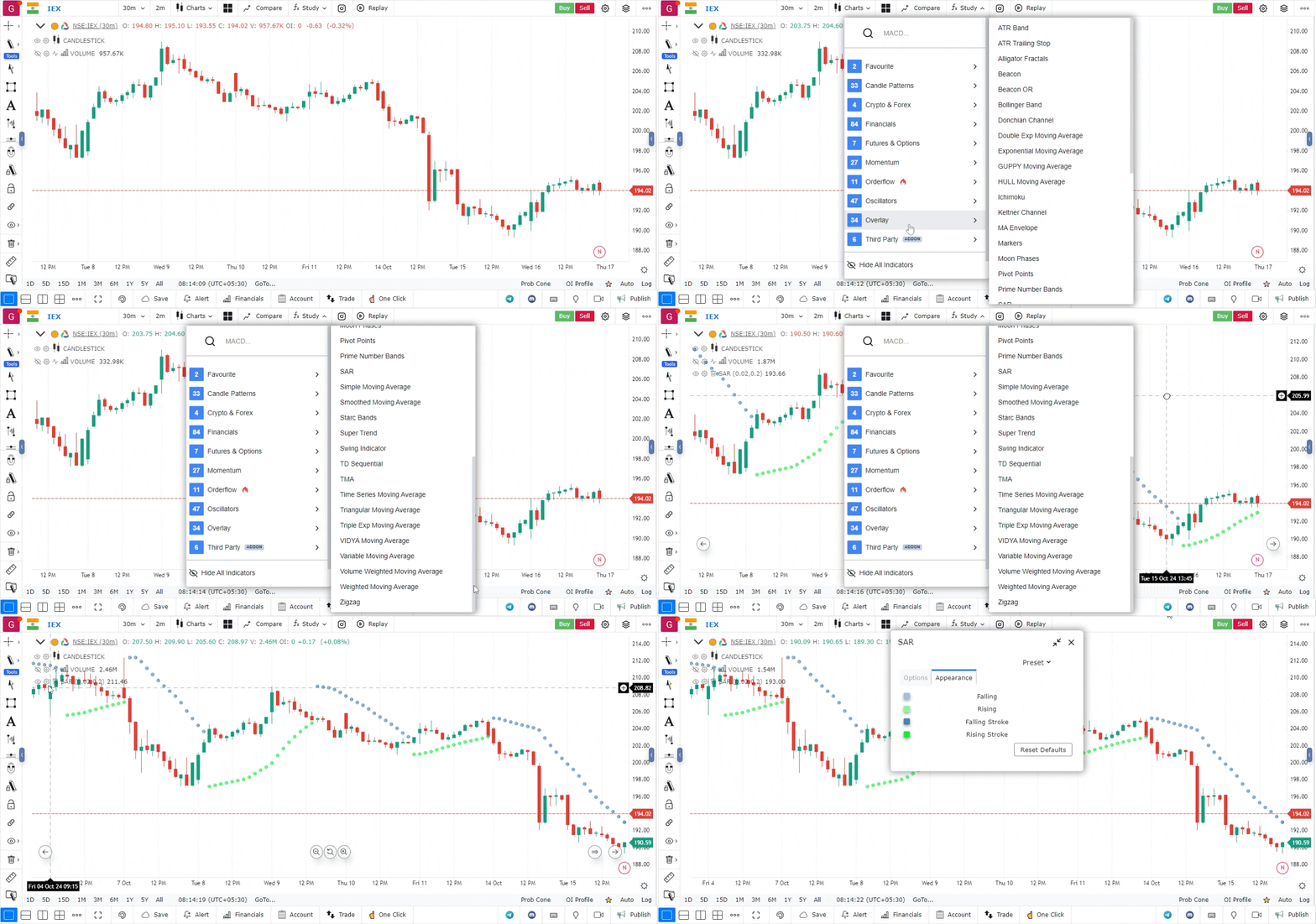
- Customize Settings:
- After adding the indicator, you can customize the following settings:
- Acceleration Factor: Adjust the acceleration factor to determine how quickly the SAR reacts to price changes (commonly set between 0.01 and 0.2).
- Maximum Step: Set a maximum value for the acceleration factor to limit how quickly the SAR can catch up to the price.
- Style: Change the colour and size of the SAR dots for better visibility on your chart.
- After adding the indicator, you can customize the following settings:
How to Interpret the SAR Indicator
-
Trend Direction:
- When the SAR dots are below the price, it indicates a bullish trend. Traders may consider entering long positions.
- When the SAR dots are above the price, it signifies a bearish trend. Traders may consider entering short positions.
-
Reversal Signals:
- A reversal signal occurs when the SAR dots switch from being below the price to above it (or vice versa). This may indicate a potential change in trend direction, prompting traders to reevaluate their positions.
-
Setting Stop-Loss Orders:
- The SAR indicator can be used to set trailing stop-loss orders. Traders can place their stop-loss just below the SAR dots in a bullish trend or just above the SAR dots in a bearish trend.
Use Case
Parabolic SAR (Stop and Reverse) plots a series of dots above or below price to identify trend direction and provide trailing stop-loss levels. When price crosses the SAR dots, it signals a potential trend reversal.
Strategy
Use Parabolic SAR as a trailing stop mechanism in trending markets. Enter long when price crosses above the SAR dots, and trail your stop at the SAR level as it moves up with the price. Exit and reverse when price crosses below the SAR.
Common Mistakes
Do not use Parabolic SAR in sideways or choppy markets — it generates excessive whipsaws. Avoid using the default settings without adjustment; the acceleration factor (0.02 default) may need to be reduced for slower-moving instruments. Do not rely on SAR alone for entries; use with a trend filter.