Parallel Channel Drawing Tool
-
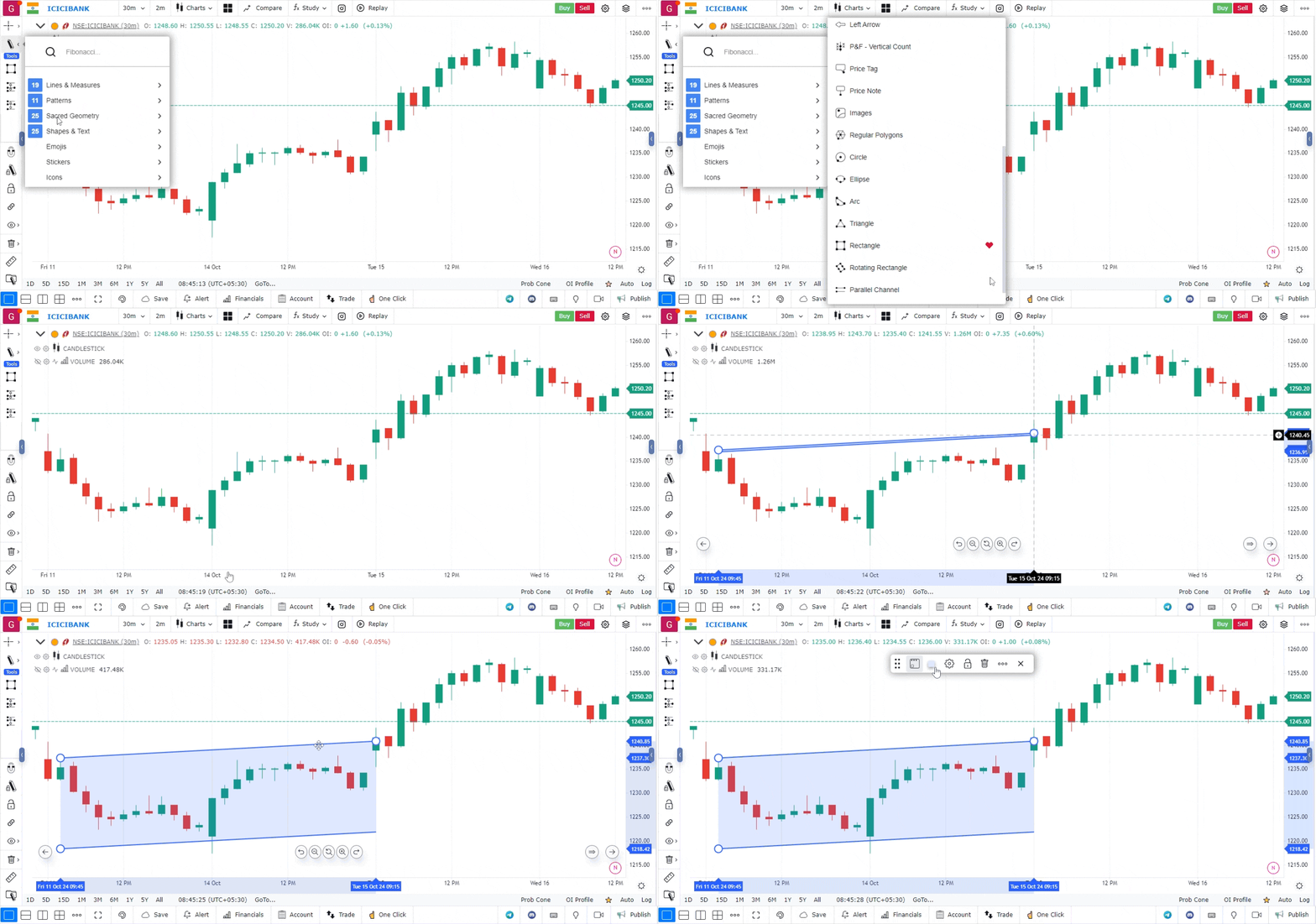
Access the Drawing Tool Bar:
- On the chart interface, locate the drawing tool bar. It is positioned on the top left-hand side of the screen.
- Click on the drawing tool bar to expand the various drawing options available.
-
Locate the Parallel Channel Tool:
- In the expanded drawing tool bar, look for the section labeled “Shapes and Texts.”
- Click on it to view the available tools, and select the “Parallel Channel” option.
-
Drawing the Parallel Channel:
- To start drawing, click on the chart where you want to place the beginning of the channel (typically at a key low or high point).
- Move your cursor to draw the main trendline of the channel, defining the direction (upward or downward).
- Click again to fix the trendline in place.
- The tool will then automatically generate a parallel line at the opposite side of the channel.
- Adjust the width of the channel by dragging the parallel line to match the price range you want to cover.
-
Adjusting and Fine-Tuning the Channel:
- You can modify the position and width of the parallel channel by clicking and dragging its edges or control points.
- Ensure that the channel contains the most significant price action within its bounds to get accurate support and resistance levels.
-
Customizing the Parallel Channel:
- Right-click on the parallel channel to access customization options.
- You can change the color, line style, thickness, and other visual elements to match your chart’s aesthetic preferences.
- Label the channel if needed, to distinguish it from other chart annotations.
-
Using the Parallel Channel for Analysis:
- Use the parallel channel to identify potential support and resistance levels, as price tends to oscillate within the channel.
- Breakouts above or below the channel lines may indicate a trend reversal or acceleration in price movement.
Use Case
The Parallel Channel tool draws two parallel lines enclosing price movement, creating a trend channel that acts as both dynamic support (lower channel line) and dynamic resistance (upper channel line). It is the most fundamental trend trading framework.
Strategy
Draw a parallel channel enclosing the current trend by connecting at least two swing highs for the upper line and two swing lows for the lower line. Enter long on pullbacks to the lower channel line with a reversal candle and target the upper channel line. Exit or reduce if the upper line is reached.
Common Mistakes
Do not enter at the upper channel line in an uptrend expecting a breakout without confirming momentum. Avoid forcing a parallel channel onto non-trending price action. Do not ignore that a decisive break below the lower channel line often signals the end of the uptrend.