Point & Figure Vertical Count Tool
-
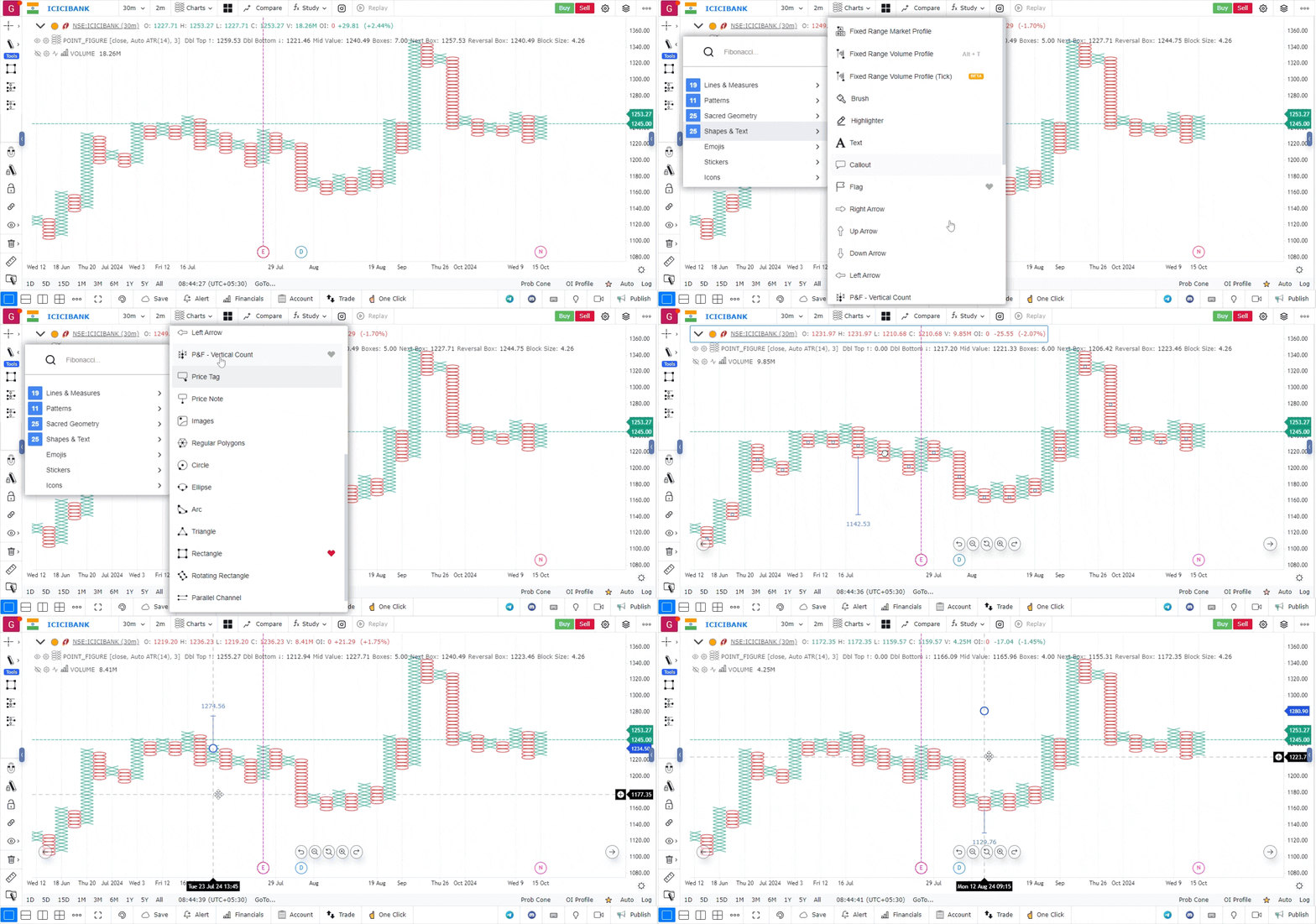
Switch to Point & Figure Chart Type:
- Make sure your chart is set to the Point & Figure (P&F) chart type.
- You can do this by clicking on the chart type dropdown menu and selecting “Point & Figure.”
-
Access the Drawing Tool Bar:
- On the chart interface, locate the drawing tool bar. This is located on the top left-hand side of the screen.
- Click on the drawing tool bar to expand the options.
-
Select Shapes and Texts:
- Within the drawing tool bar, click on the section labeled “Shapes and Texts.”
- This section contains various drawing and annotation tools that you can use on your charts.
-
Activate the P&F Count Tool:
- Look for the specific option named “P&F Count Tool” under the Shapes and Texts menu.
- Click on the P&F Count Tool to activate it.
-
Using the P&F Count Tool:
- Click on the breakout column in your P&F chart where you want to start the count.
- Drag the tool across the chart to select the range of the vertical column, marking the area you wish to analyze.
- The tool will automatically calculate the vertical count and display the projected price target on the chart.
-
Interpretation of Results:
- The tool will provide a visual representation of the calculated price target based on the vertical count.
- You can adjust the parameters, such as the box size and reversal value, to refine your analysis if needed.
-
Customization and Fine-Tuning:
- Customize the settings to match your preferred box size, scaling, and other P&F parameters to ensure the most accurate analysis.
- Make use of additional charting tools on the platform to combine P&F analysis with other technical indicators.
Use Case
The Point & Figure shapes drawing tool enables manual drawing of P&F patterns and column annotations directly on standard candlestick charts, allowing traders to integrate P&F analysis with conventional technical analysis.
Strategy
Use the Point & Figure shapes to annotate traditional double-top and double-bottom P&F breakout patterns on your candlestick chart. Mark where the P&F breakout signal occurred and use it as a directional bias filter for your conventional chart analysis.
Common Mistakes
Do not attempt to recreate a full P&F chart using shape annotations on a candlestick chart. Avoid using P&F pattern shapes without understanding their theoretical context. Do not use these annotations without also applying proper candlestick analysis for timing precision.