The Long Position Drawing Tool
The Long Position Drawing Tool is a valuable feature that allows traders to visually represent potential long (buy) positions on their charts. This tool helps users assess risk-reward ratios, set target prices, and define stop-loss levels for their trades. By illustrating potential long positions, traders can enhance their decision-making process and improve their overall trading strategy.
How to Use the Long Position Drawing Tool
-
Open the Chart:
- Log into your account.
- Load the chart for the asset or financial instrument you wish to analyze.
-
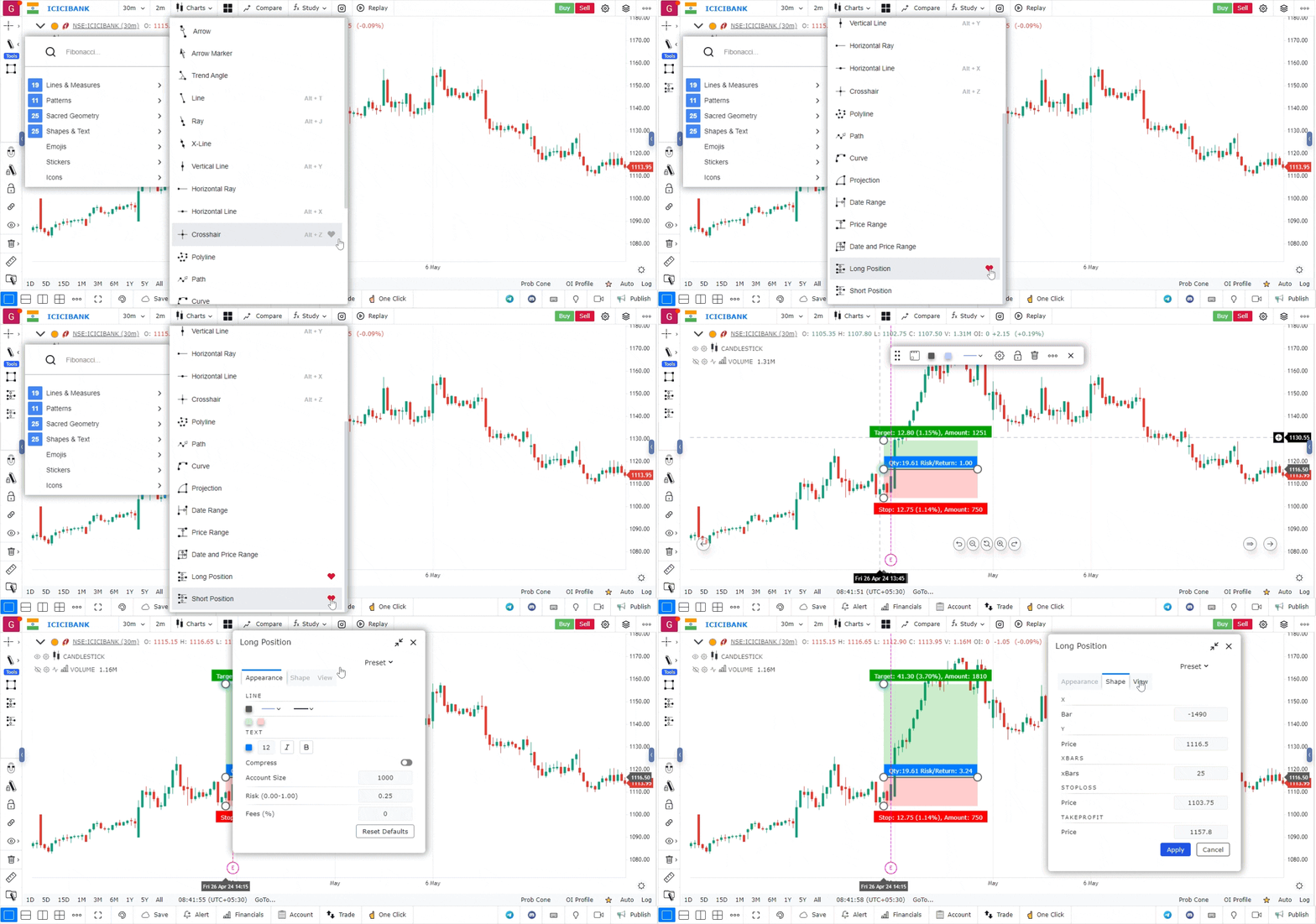
Access the Drawing Tools Menu:
- Locate the drawing tools menu, typically found on the left side or at the top of the platform interface.
- Click on the drawing tools icon to open a list of available tools.
-
Select the Long Position Drawing Tool:
- From the list of tools, choose the Long Position Drawing Tool.
- The icon for this tool usually resembles an upward arrow or a long position marker.
-
Draw the Long Position:
- Click on the chart at the price level where you intend to enter the long position.
- Drag your cursor to define the desired target price level for your exit.
- Release the mouse button to finalize the drawing.
-
Customize the Long Position (Optional):
- Right-click on the drawn position to access customization options.
- You can adjust parameters like entry price, target price, stop-loss level, and colors to match your chart’s theme or enhance visibility.
-
Review the Risk-Reward Ratio:
- The tool often provides a visual representation of the risk-reward ratio based on your entry, target, and stop-loss levels.
- This helps in assessing whether the potential reward justifies the risk taken.
-
Move or Adjust the Long Position:
- To reposition the long position, click and drag it to a new location.
- If you want to delete the entire position, right-click on it and select the delete option.
Use Case
The Long Position drawing tool creates a visual trade plan directly on the chart, showing the entry price, stop-loss level, and profit target with calculated risk-reward ratio. It is used for pre-trade planning and risk management visualisation.
Strategy
Before entering any long trade, use the Long Position tool to draw your plan: set the entry at your intended price, set the stop below the nearest support or swing low, and set the target at the next significant resistance. Only take the trade if the visualised risk-reward is at least 1:2.
Common Mistakes
Do not use the Long Position tool as a replacement for a trade journal entry. Avoid moving the stop lower after placing it — the initial stop is based on your analysis. Do not set targets arbitrarily; base them on the next significant technical level.