Donchian Width
The Donchian Width indicator is a tool used in technical analysis to measure the difference between the upper and lower bands of the Donchian Channel. It provides insights into market volatility and can help traders identify potential breakout opportunities. The Donchian Channel itself is constructed by plotting the highest high and the lowest low over a specified period, typically used in trend-following strategies.
Overview of Donchian Width
The Donchian Width is calculated as the difference between the upper and lower bands of the Donchian Channel. A wider channel indicates increased volatility, while a narrower channel suggests a consolidation phase or reduced volatility. Traders can use this information to gauge market conditions and make more informed trading decisions.
Key Features of Donchian Width
- Volatility Measurement: The Donchian Width helps traders assess market volatility, which can indicate the strength of a potential breakout or reversal.
- Trend Confirmation: Changes in the Donchian Width can signal shifts in market trends, helping traders confirm their positions.
- Customizable Settings: Traders can adjust the period used for the Donchian Channel to align with their specific trading strategies.
How to Use Donchian Width
-
Open the platform:
- Log in to your account.
- Load the chart for the asset you want to analyze.
-
Select the Timeframe:
- Choose a suitable timeframe that fits your trading style (e.g., daily, hourly).
-
Add the Donchian Channel Indicator:
- Go to the Indicators section in the platform interface.
- Search for Donchian Channel.
- Click to add the indicator to your chart.
-
Add the Donchian Width Indicator:
- In the Indicators section, search for Donchian Width.
- Click to add the indicator to your chart, typically displayed as a line beneath the price chart.
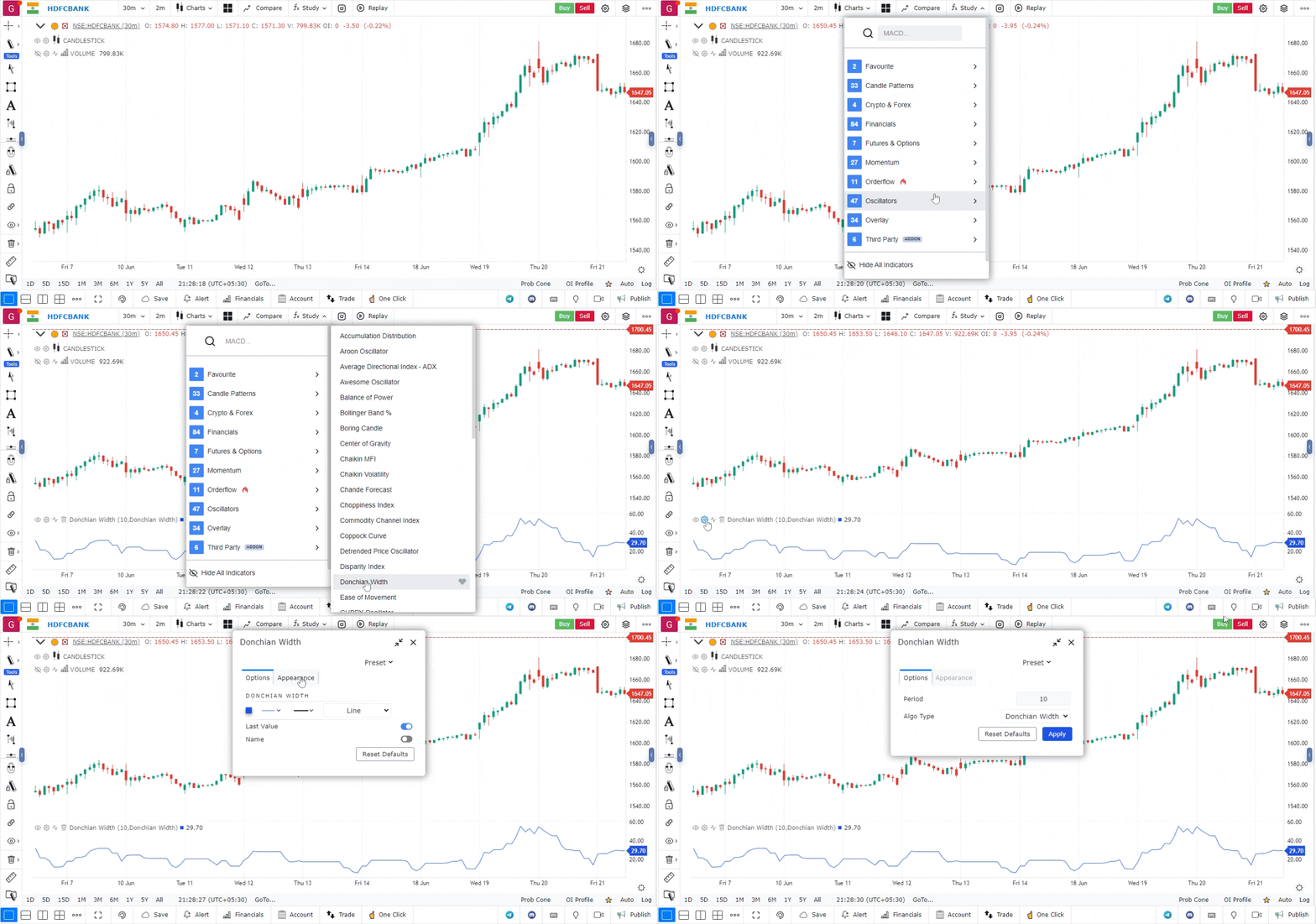
-
Interpret the Indicator:
- The Donchian Width will appear as a line representing the difference between the upper and lower bands.
- Wider widths indicate higher volatility, while narrower widths suggest lower volatility.
-
Make Trading Decisions:
- Breakout Signal: A sudden increase in Donchian Width can signal an impending breakout, prompting traders to consider entering a position.
- Volatility Compression: A narrowing Donchian Width may indicate that the market is consolidating, suggesting a potential breakout in either direction.
-
Combine with Other Indicators:
- Use the Donchian Width alongside other technical indicators (like moving averages, RSI, or MACD) to confirm trading signals and strengthen your strategy.
Use Case
The Donchian Channel plots the highest high and lowest low over a set period, identifying breakout levels and trend direction. It is the foundation of the Turtle Trading system and is widely used for systematic breakout strategies.
Strategy
Enter long when price closes above the upper Donchian band. Set a stop below the middle band. Trail stops using the lower band as the trend progresses. Use a 20-period for swing trades and 55-period for position trades.
Common Mistakes
Do not enter on every upper band touch; wait for a close above the band. Avoid Donchian channels in choppy markets where false breakouts are frequent. Adjust period based on the market’s average trend length.