The Curve Drawing Tool
The Curve Drawing Tool is a valuable feature that allows users to create smooth, curved lines on their charts. This tool is particularly useful for illustrating trends, price movements, and patterns that require a more fluid representation than straight lines. It can help traders visualize potential support and resistance levels and analyze market dynamics more effectively.
How to Use the Curve Drawing Tool
-
Open the Chart:
- Log into your account.
- Load the chart of the asset or financial instrument you wish to analyze.
-
Access the Drawing Tools Menu:
- Locate the drawing tools menu, typically found on the left side or at the top of the platform interface.
- Click on the drawing tools icon to open a list of available tools.
-
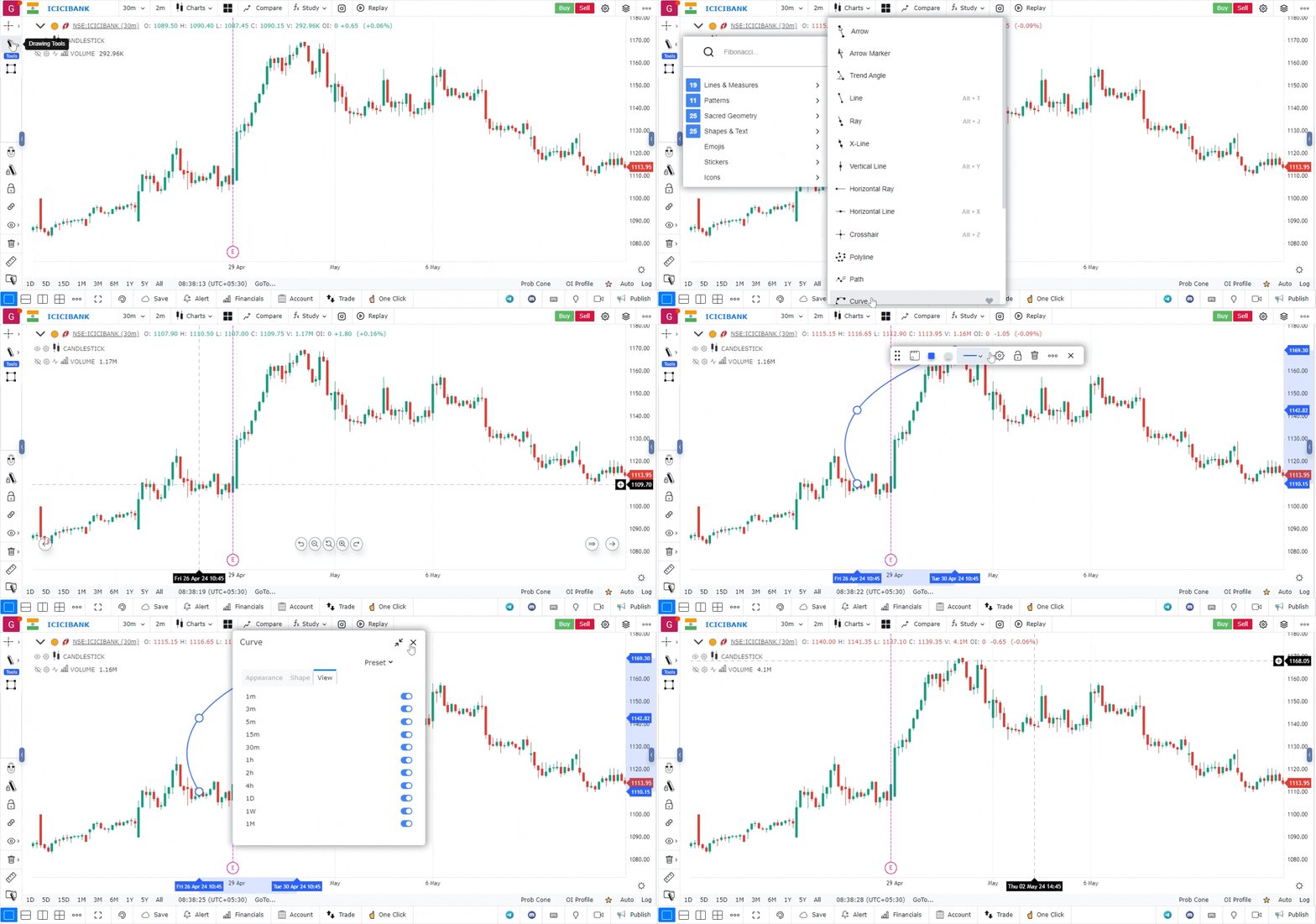
Select the Curve Drawing Tool:
- From the list, choose the Curve Drawing Tool.
- The icon for this tool usually resembles a curved line.
-
Draw the Curve:
- Click on the chart to set the starting point of your curve.
- Continue to click at various points to define the shape of the curve. The tool will automatically create a smooth line connecting your clicks.
- Adjust the curve by clicking at different points to alter its shape as needed.
-
Complete the Curve:
- To finish drawing the curve, double-click on the last point or press the ‘Enter’ key.
- The curve will remain on the chart for further analysis.
-
Customize the Curve (Optional):
- Right-click on the curve to access customization options.
- You can change the color, thickness, and style (solid, dashed, or dotted) of the curve to enhance visibility or match your chart’s aesthetic.
-
Move or Adjust the Curve:
- To reposition any part of the curve, click and drag the curve or any of its anchor points to a new location.
- If you wish to delete the entire curve, right-click on it and select the delete option.
Use Case
The Curve drawing tool allows traders to draw curved trend lines on the chart, following the natural arc of parabolic price moves and curved support/resistance boundaries. It is used for analysing exponential moves and arc patterns.
Strategy
Apply the Curve tool to identify parabolic uptrends where price accelerates away from a straight trend line. Draw a curve connecting the sequence of lows in an accelerating uptrend. When price breaks below the curve, it signals a deceleration or reversal — exit or reduce long exposure.
Common Mistakes
Do not force a curve onto price data that follows a straight linear trend. Avoid using curved trend lines for near-term intraday analysis where straight lines are more applicable. Do not mistake a curve for a permanent level; adjust it regularly as the market evolves.