Stochastic Oscillator
The Stochastic Oscillator is a momentum indicator that compares a particular closing price of an asset to a range of its prices over a specific period. It helps traders identify overbought or oversold conditions and potential reversal points in the market.
Overview of the Stochastic Oscillator
- Purpose: The Stochastic Oscillator aims to determine the momentum of price movements, making it a valuable tool for identifying potential buying and selling opportunities based on market conditions.
- Market Analysis: By evaluating the relationship between closing prices and price ranges, the Stochastic Oscillator can signal when an asset is overbought or oversold.
Key Features of the Stochastic Oscillator
- Oscillator Scale:
- The Stochastic Oscillator is plotted on a scale from 0 to 100. The most commonly used thresholds are 20 and 80.
- An oscillator reading above 80 typically indicates an overbought condition, while a reading below 20 indicates an oversold condition.
- Components:
- The Stochastic Oscillator consists of two lines: %K and %D.
- %K Line: The main line that represents the current closing price relative to the price range over a specified period.
- %D Line: A smoothed moving average of the %K line, often set to a 3-period average, which helps to identify the trend direction.
- The Stochastic Oscillator consists of two lines: %K and %D.
- Crossovers:
- Buy signals can be generated when the %K line crosses above the %D line, especially when both lines are in the oversold region.
- Sell signals can be indicated when the %K line crosses below the %D line, particularly when both lines are in the overbought region.
How to Use the Stochastic Oscillator
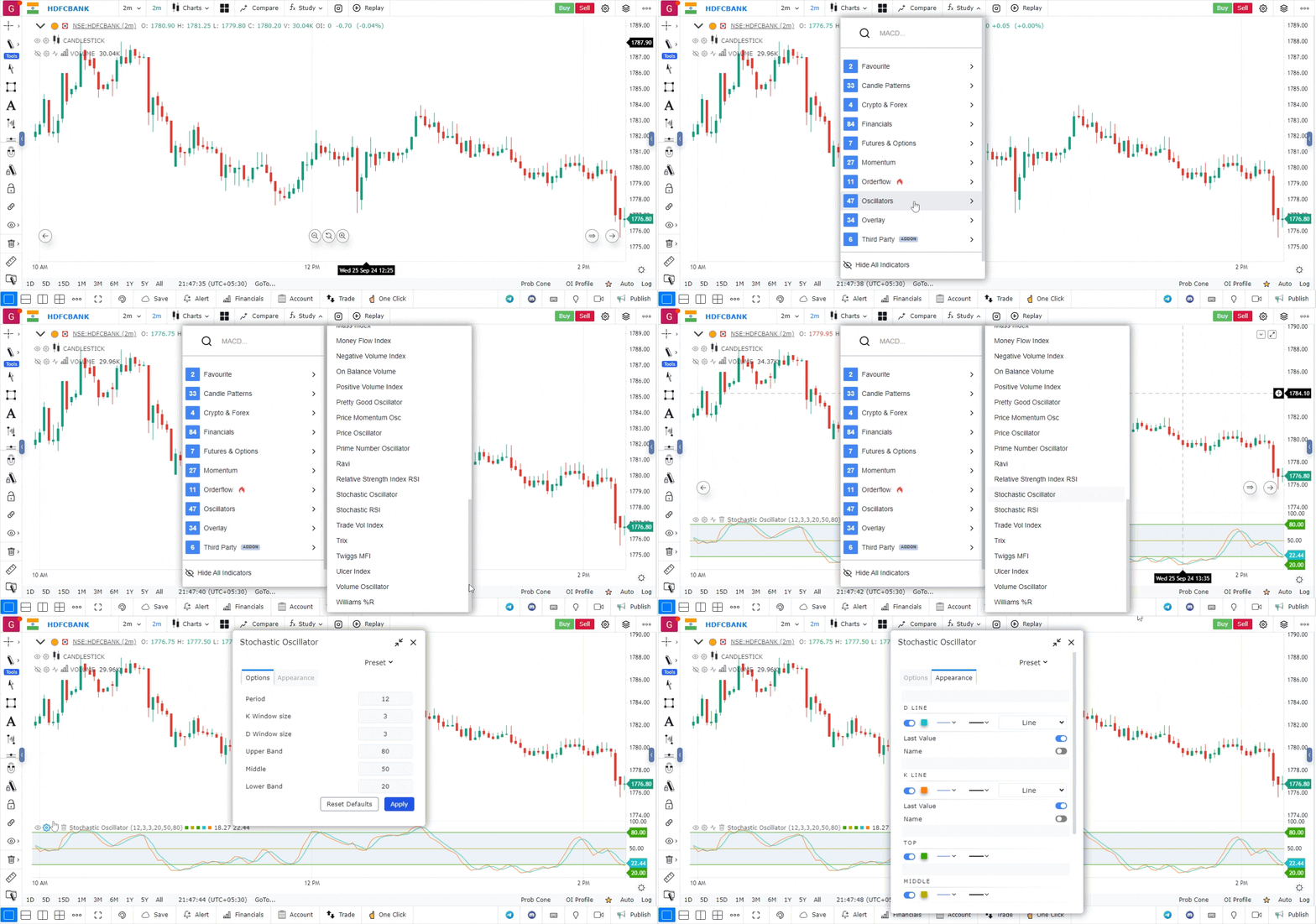
- Access the Indicators Section
- Click on the “Indicators” or “Studies” menu located at the top of the chart.
- Expand the list of available indicators and technical studies.
- Find and Add the Stochastic Oscillator
- Search for Stochastic: Enter “Stochastic Oscillator” in the search bar of the indicators list.
- Add the Indicator: Click on the Stochastic Oscillator to add it to your chart. It will appear as two lines in a separate panel below the main price chart.
- Customize the Stochastic Oscillator
- Settings: Access the settings by right-clicking on the Stochastic Oscillator lines or clicking on the settings icon.
- Adjust the periods for %K and %D according to your trading strategy. The default settings are often 14 for %K and 3 for %D.
- Modify the line colors, styles, and thicknesses to suit your preferences.
- Interpret the Stochastic Oscillator Signals
- Overbought Conditions: Readings above 80 suggest that the asset may be overbought, which could signal a potential selling opportunity.
- Oversold Conditions: Readings below 20 indicate that the asset may be oversold, suggesting a potential buying opportunity.
- Crossovers: Look for crossovers between the %K and %D lines to identify potential buy and sell signals.
- Make Trading Decisions Using the Stochastic Oscillator
- Trend Confirmation: Use the Stochastic Oscillator to confirm the strength of a trend. In a strong uptrend, overbought conditions may persist, while in a downtrend, oversold conditions may also continue.
- Divergence Analysis: Watch for divergences between the Stochastic Oscillator and price action. For example, if the price makes new highs while the Stochastic Oscillator does not, it could indicate a weakening trend.
Use Case
The Stochastic Oscillator compares the closing price to the high-low range over a set period, measuring momentum. It is one of the most tested and reliable indicators for identifying overbought and oversold conditions in ranging markets.
Strategy
In a ranging market, buy when the slow stochastic %K crosses above %D below the 20 level. In a trending market, buy pullbacks when Stochastic reaches 30-40 and turns back up. Use the slow stochastic (3-period smoothing) to reduce false signals.
Common Mistakes
Do not use Stochastic as a reversal tool in strongly trending markets. Avoid acting on every 80/20 crossover without confirming the broader trend. Do not use the fast stochastic for trade entries; the slow version is far more reliable.