ATR (Average True Range) Bands
-
What is ATR?
- The Average True Range (ATR) is a technical indicator that measures market volatility by analyzing the range of price movements over a specific period.
- It calculates the average of the true ranges over a defined number of periods, typically 14.
-
ATR Bands Overview:
- ATR Bands are a volatility-based indicator derived from the ATR value.
- The bands are plotted on the chart above and below the price line, usually at a distance of 1, 2, or 3 times the ATR value from the current price.
- The width of these bands expands when volatility increases and contracts when volatility decreases.
-
How to Interpret ATR Bands:
- Breakouts: When the price moves outside of the ATR band, it indicates a potential breakout in the direction of the movement.
- Trend Continuation: If the price consistently moves near the upper or lower band, it suggests a strong trend in that direction.
- Reversal Signals: When the price returns inside the band after a breakout, it might indicate a trend reversal or weakening momentum.
Using ATR Bands
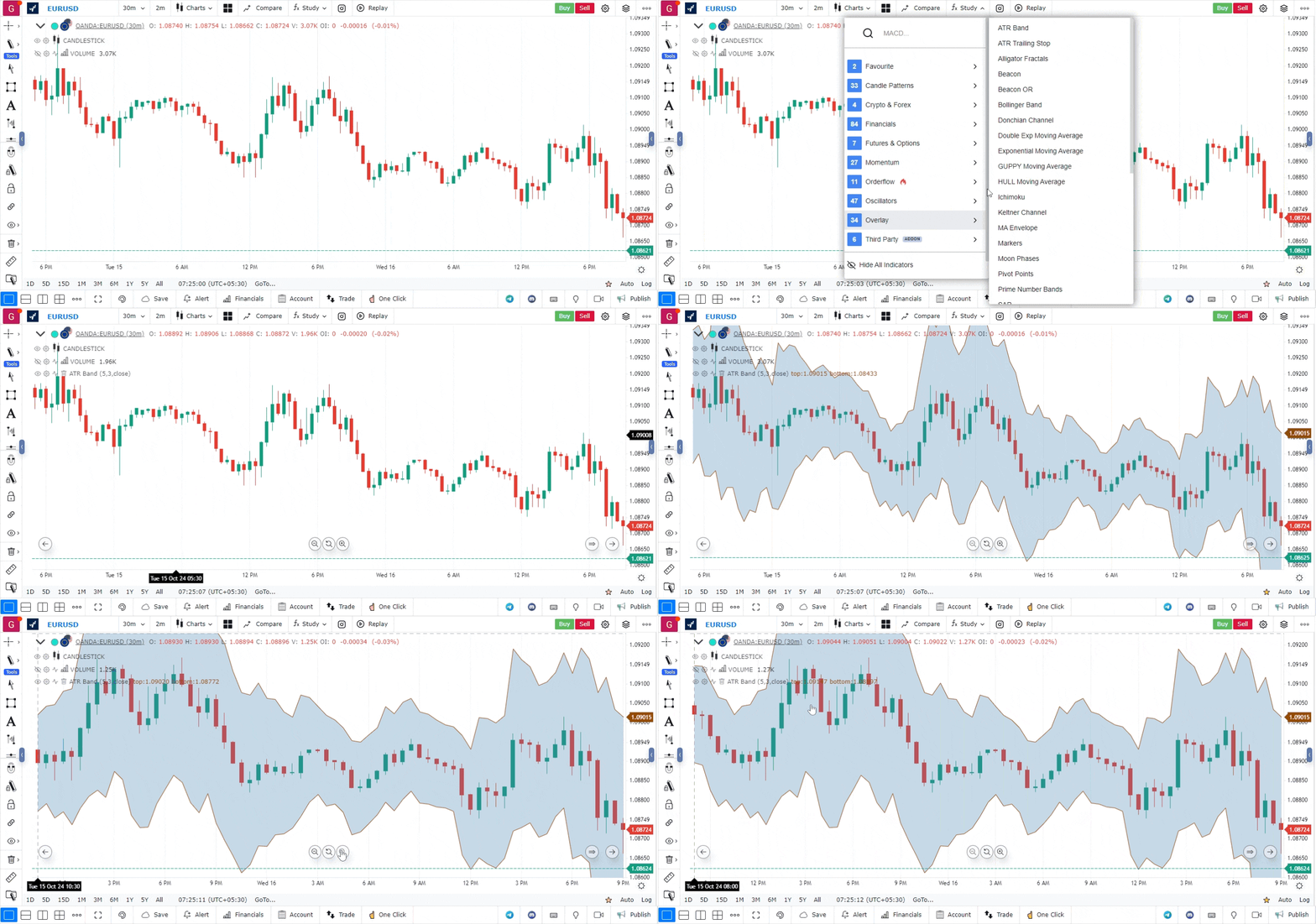
- Adding ATR Bands to Your Chart:
- Open the platform and select the chart of the asset you want to analyze.
- Go to the Indicators section and search for “ATR Bands” or “Average True Range.”
- Once selected, the ATR bands will appear on your chart.
-
Configuring ATR Band Settings:
- You can adjust the parameters such as the period of the ATR calculation and the multiplier for the bands (e.g., 1x, 2x, or 3x the ATR value).
- Set these values according to your trading strategy or the asset’s volatility characteristics.
-
Strategy Integration:
- ATR Bands can be combined with other technical indicators like moving averages, RSI, or MACD to confirm trading signals.
- They are often used in breakout strategies or to set stop-loss levels in volatile markets.
-
Back Testing:
- Use the backtesting feature to evaluate how well ATR Bands have performed with your chosen settings in historical data.
- This can help refine your strategy for better risk management and trade execution.
Use Case
ATR Bands plot dynamic support and resistance levels around a central moving average using Average True Range multiples. They expand in volatile markets and contract in quiet markets, making them adaptive to current conditions.
Strategy
In an uptrend, use the lower ATR Band as a dynamic support level for pullback entries. Enter long when price touches the lower band and shows a reversal candle. Set stops below the lower band and target the upper band.
Common Mistakes
Do not use the same ATR multiplier across all instruments. Avoid treating every band touch as a reversal signal in strong trends. Do not ignore that expanding bands signal increasing risk; reduce position size when bands widen significantly.