Dynamic Volumetric Order Blocks
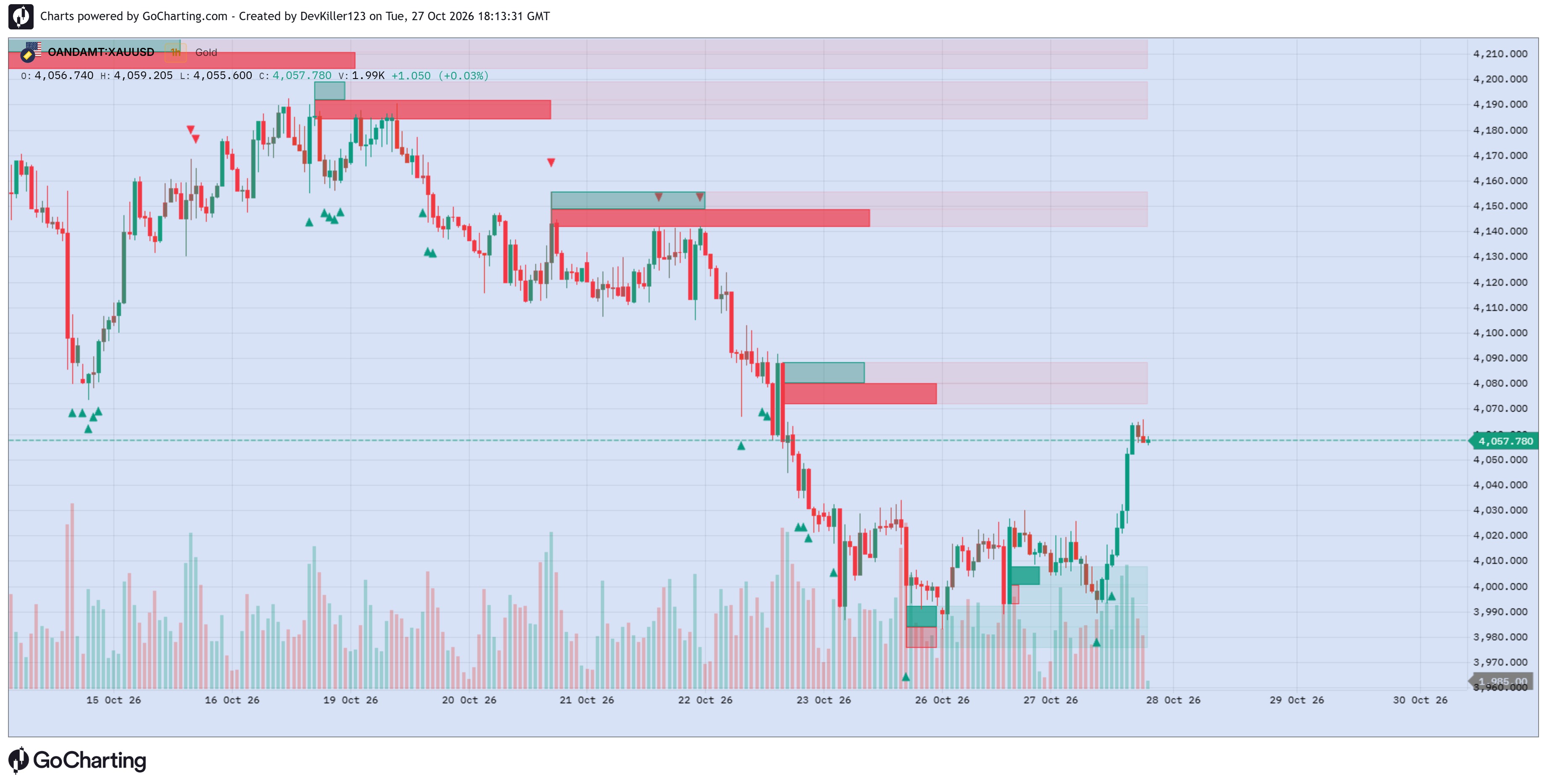
Dynamic Volumetric Order Blocks is a price-action analysis indicator designed to identify and visualize potential bullish and bearish order block zones directly on the chart.
The indicator combines pivot-based market structure detection with volume information, configurable order block construction, mitigation tracking, and dynamic candle coloring based on directional volume pressure. It also provides optional buy/sell activity visualization, volume metrics, midpoint lines, and boundary-touch markers.
Its goal is to help traders study potential reaction zones, observe how price interacts with previously identified blocks, and analyze directional activity around those areas.
1. MAIN FEATURES
Bullish and Bearish Order Blocks: Identifies potential order block zones using pivot-based market structure logic and volume pivots.
Configurable Block Construction: Choose between ATR-based Length mode and Full candle-range mode.
Mitigation Detection: Remove blocks according to the selected Close, Wick, or Avg mitigation method.
Overlap Filtering: Optionally hide older blocks that overlap the newest block.
Buy/Sell Activity Visualization: Displays activity sections within order blocks using bullish and bearish colors.
Volume Metrics: Displays each visible block's recorded volume and its percentage of the total volume of the displayed blocks.
Midpoint Lines: Optionally plots the midpoint of each order block.
Dynamic Candle Coloring: Colors chart candles according to the latest order block's direction and calculated candle-level volume pressure.
Boundary-Touch Triangles: Marks candles that touch the upper or lower boundary of active bullish or bearish order blocks.
Display Controls: Configure the maximum number of visible blocks and control the visibility of block drawings, activity sections, volume metrics, midpoint lines, and touch markers.
2. ORDER BLOCK DETECTION
The indicator uses a configurable pivot lookback period to evaluate historical price structure and identify volume pivot events.
When a qualifying volume pivot is detected, the indicator creates a bullish or bearish order block according to its market structure direction.
Bullish Order Blocks
Bullish blocks are associated with the indicator's bullish market structure condition. Their zones are drawn from the historical pivot candle's low to the calculated bullish zone top.
Bearish Order Blocks
Bearish blocks are associated with the indicator's bearish market structure condition. Their zones are drawn from the calculated bearish zone bottom to the historical pivot candle's high.
These zones represent areas identified by the indicator's algorithm. They should not automatically be interpreted as verified institutional orders or guaranteed support and resistance levels.
3. ORDER BLOCK CONSTRUCTION MODES
Length Mode
Uses the historical pivot candle's Average True Range (ATR) to calculate the order block's range, subject to the candle's high and low boundaries.
This mode allows the zone's construction to reflect a volatility-based range.
Full Mode
Uses the full high-to-low range of the historical pivot candle to define the order block.
Pivot Lookback Length — Default: 20
Sets the lookback period used by the pivot and ATR calculations. Changing this setting affects the historical structure and volume-pivot conditions used to create blocks.
4. MITIGATION SETTINGS
The Mitigation Method setting determines when an existing block is removed.
Close: Removes a bullish block when the lower of the current candle's open and close falls below its bottom. Removes a bearish block when the higher of the open and close rises above its top.
Wick: Removes a bullish block when the candle's low falls below the block bottom, or a bearish block when its high rises above the block top.
Avg: Removes a bullish block when the candle's low falls below the midpoint, or a bearish block when its high rises above the midpoint.
Mitigation is processed on confirmed bars. Once a block meets the selected removal condition, it is removed from the indicator's active block collection.
Hide Overlapping Blocks
When enabled, the indicator removes older blocks that overlap the newest block according to its overlap-checking logic. This helps reduce overlapping drawings and prioritize more recent zones.
5. BUY/SELL ACTIVITY METRICS
The indicator can display two activity sections inside each visible order block.
Bullish Activity: Displayed in the configured bullish color.
Bearish Activity: Displayed in the configured bearish color.
The activity sections are constructed using the indicator's internal sequence-counting logic. Their widths and visual proportions are based on the accumulated bullish and bearish activity counts.
The displayed activity is an indicator-generated metric. It should not be treated as a direct record of actual executed buyer-initiated and seller-initiated trades.
6. VOLUME METRICS
When enabled, each visible block can display its recorded pivot-candle volume together with a percentage.
The percentage is calculated relative to the combined recorded volume of the currently displayed blocks.
Volume Metric Text Size
Choose from Tiny, Small, Normal, Large, or Huge to control the label text size.
These figures provide context for comparing the recorded volumes associated with the displayed zones. They do not represent the total volume traded inside each zone after its creation.
7. STRENGTH-BASED CANDLE COLORS
The indicator calculates bullish and bearish volume-pressure estimates from the candle's volume and closing-price location within its high-low range.
It then calculates a directional strength value for the current candle and applies a gradient between a transparent version of the selected color and the fully visible color.
Bullish Color — Default: Teal (#089981)
Bearish Color — Default: Red (#F23645)
Volume Strength Lookback — Default: 100
The Volume Strength Lookback controls the EMA period used for the smoothed bullish and bearish volume-pressure calculations. The candle coloring itself uses the current candle's calculated pressure in the direction of the latest active order block.
Candle coloring is therefore dependent on the latest active block's direction and the current candle's pressure calculation. It is a visual estimate, not a complete order-flow or bid/ask delta measurement.
8. ORDER BLOCK BOUNDARY-TOUCH TRIANGLES
The indicator includes optional triangle markers to highlight candles that touch the boundaries of active order blocks.
Bullish Boundary Touch: An upward triangle appears below the candle when a bullish order block's upper or lower boundary is touched.
Bearish Boundary Touch: A downward triangle appears above the candle when a bearish order block's upper or lower boundary is touched.
Enable or disable these markers using Show Boundary Touch Triangles.
The markers indicate boundary contact only. They do not independently confirm a bounce, rejection, breakout, or trade entry.
9. INPUT SETTINGS
01. Order Block Display
Display Order Blocks — Default: Enabled
Enables or disables the display of order block zones.
Maximum Visible Order Blocks — Default: 6
Controls the maximum number of active blocks drawn, with a configurable range of 0–50.
Show Midpoint Line — Default: Enabled
Controls the display of block midpoint lines.
02. Detection & Mitigation
Construction Mode — Default: Length
Selects ATR-based construction or the full candle range.
Pivot Lookback Length — Default: 20
Controls the pivot and ATR calculation period.
Mitigation Method — Default: Close
Selects Close, Wick, or Avg removal logic.
Hide Overlapping Blocks — Default: Enabled
Removes older overlapping zones according to the script's overlap filter.
03. Activity Metrics
Display Buy/Sell Activity — Default: Enabled
Controls the display of bullish and bearish activity sections.
Show Volume Metrics — Default: Enabled
Controls the display of block volume and relative volume percentages.
Volume Metric Text Size — Default: Normal
Controls the volume label text size.
04. Strength-Based Bar Colors
Bullish Color: Sets the bullish activity color.
Bearish Color: Sets the bearish activity color.
Volume Strength Lookback — Default: 100
Controls the smoothing period used in the volume-pressure calculations.
06. Order Block Touch Signals
Show Boundary Touch Triangles — Default: Enabled
Controls the visibility of the boundary-touch markers.
10. SUGGESTED WORKFLOW
Begin with the default settings to observe how the indicator identifies historical and newly formed order blocks.
Choose Length or Full construction according to the zone definition you want to examine.
Select a mitigation method that matches your preferred definition of when a zone is no longer active.
Use overlap filtering to reduce chart clutter when several zones are close together.
Enable activity metrics and volume labels when comparing the indicator's calculated activity across zones.
Review boundary-touch markers alongside price action instead of treating them as standalone entry signals.
Test the indicator on different symbols and timeframes to understand how its pivot and volume conditions behave.
11. IMPORTANT LIMITATIONS
Order blocks are generated using the script's pivot-based structure logic and volume-pivot conditions. Their presence does not prove that institutional orders exist at those prices.
Pivot-based detection uses historical bars, so a zone can be identified only after the required pivot lookback bars have elapsed. The drawing may be positioned at the historical pivot candle even though the detection occurs later.
Volume data can differ between symbols, exchanges, and data providers. The activity metrics and candle colors are algorithmic estimates based on the available OHLCV data, not exchange-level order-flow measurements.
Boundary-touch markers indicate that a candle's range intersects a block boundary. They do not guarantee a market reaction.
The indicator does not place orders, execute trades, or guarantee profitable results.
DISCLAIMER
Dynamic Volumetric Order Blocks is provided for technical analysis and educational purposes only. It does not constitute financial advice. Trading financial markets involves risk, including the possible loss of capital. Conduct your own research and use appropriate risk management. Past performance does not guarantee future results.
The information and publications are not meant to be, and do not constitute, financial, investment, trading, or other types of advice or recommendations supplied or endorsed by GoCharting. Read more in the Terms of Use.
Related Scripts
![Mark Minervini Trend Template VCP Breakout [Jayadev Rana]](https://gocharting.com/screenshots/c023abba-12b7-47ba-a49d-4ff624294516.png)
Comments (0)
Loading comments…